Introduction
Adobe Experience Manager (AEM) is an enterprise content management platform that enables organizations to create, manage, and deliver personalized digital experiences across multiple channels.
AEM <> MoEngage
The integration connects AEM to MoEngage via a custom workflow process, allowing real-time content synchronization from AEM to MoEngage Content Blocks. The integration enables marketing teams to manage content centrally in AEM while leveraging it in MoEngage campaigns for personalized customer engagement.
Use Cases
Integrating Adobe Experience Manager with MoEngage helps you with the following use cases:
- Campaign Content Management: Marketing teams create promotional content in AEM. When published, it automatically syncs to MoEngage Content Blocks, making it immediately available for email campaigns, push notifications, and in-app messages.
- Personalized Experience Delivery: Create localized Experience Fragments in AEM with personalization tokens. These automatically sync with MoEngage, utilizing converted tokens to enable personalized campaigns based on user attributes.
- Dynamic Content Updates: Update product descriptions, offers, or messaging in AEM. Changes automatically propagate to all active MoEngage campaigns using those Content Blocks, ensuring consistency across channels.
- Multi-Channel Content Reuse: Author content once in AEM and use it across multiple MoEngage campaigns (email, push, in-app) without duplication or manual copying.
Integration
Approach
Implement a custom integration within AEM and use custom workflows to an API call to MoEngage Content Block APIs whenever relevant content is created, updated, or published. This ensures MoEngage has access to the latest AEM content.
Flow diagram
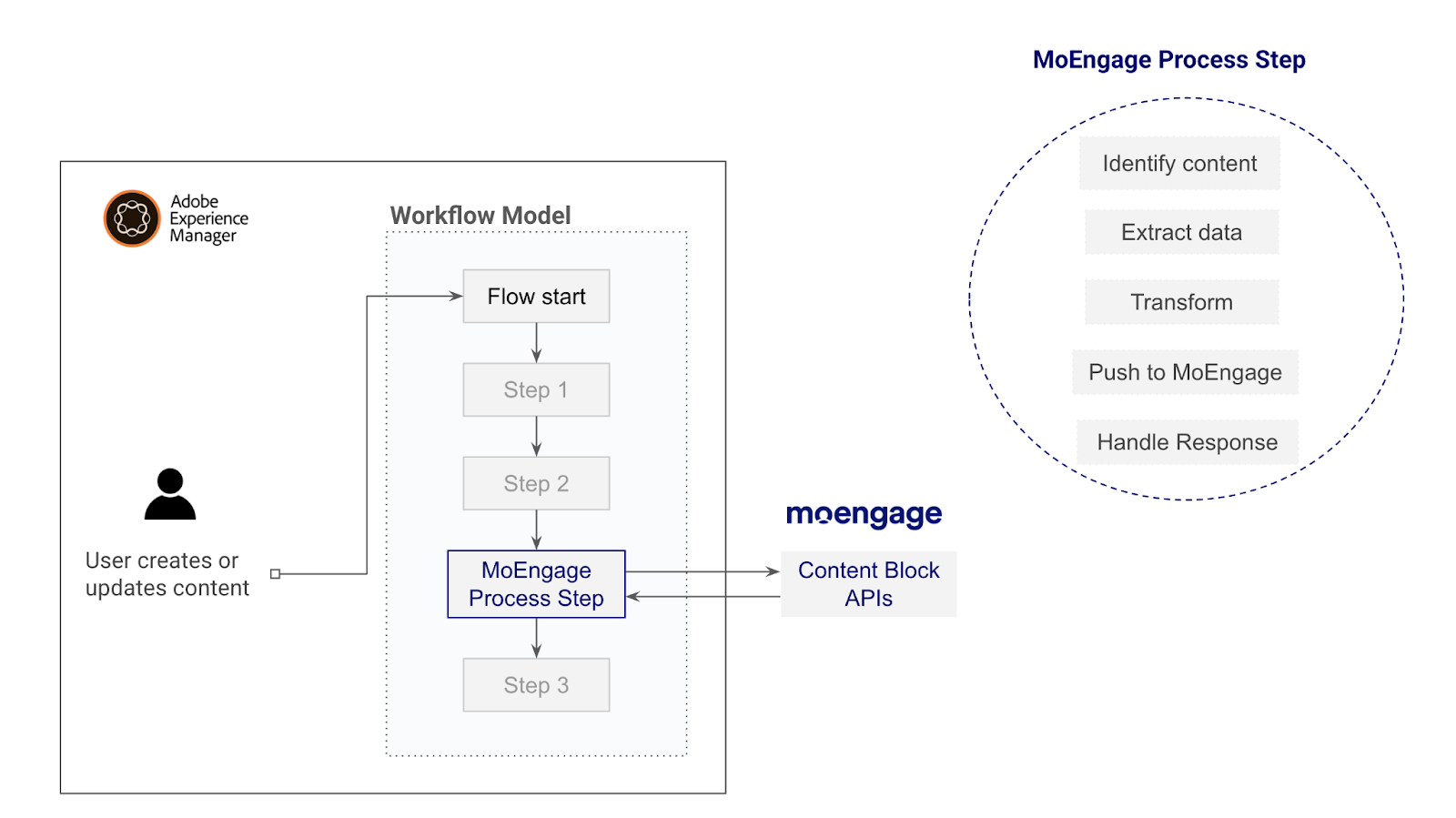
We will to develop a custom AEM Workflow Process Step that connects to the MoEngage APIs.
Supported Content Types
The following table outlines the content types that can be synced from AEM to MoEngage:
| Content Type | Description | MoEngage Sync Type |
|---|---|---|
| Experience Fragments | Reusable content components with HTML, text, and media | Content Block (HTML) |
| Content Fragments | Structured content with predefined models and elements | Content Block (HTML/Text) |
| DAM Assets (.html, .txt) | Text or HTML files stored in Digital Asset Manager | Content Block (HTML/Text) |
Supported Actions
| Actions in AEM | Results in MoEngage |
|---|---|
| Publish | Creates/Updates Content Blocks (status: ACTIVE) |
| library_add_check |
Prerequisites Before you begin, ensure you have the following requirements:
|
Step 1: Get your MoEngage API Credentials
To find your credentials, perform the following steps:
- On the left navigation menu in the MoEngage UI, click Settings > Account > APIs.
- On the APIs page, copy the following credentials:
- Workspace ID (earlier app id): You can use this as API Key (MOE-APPKEY header)
-
Campaign API Secret: You can use this as Basic Authentication
- Find your data center code from your dashboard's URL. For more information, refer Data Centers in MoEngage.
Step 2: Update Maven Project Dependencies
To update Maven project dependencies, perform the following steps:
- Add the
org.jsonlibrary to your AEM project'score/pom.xmlfile to ensure proper JSON payload construction. - Locate the
<dependencies>section incore/pom.xml. - Add the following dependency:
<dependency>
    <groupId>org.json</groupId>
    <artifactId>json</artifactId>
    <version>20231013</version>
    <scope>compile</scope>
</dependency>
Why org.json?
The org.json library automatically escapes special characters (quotes, newlines) in HTML content, preventing JSON payload errors. Manual string concatenation can break the MoEngage API call if content contains these characters.
Step 3: Setting up the Custom Workflow
You need to create an OSGi service that handles content sync to MoEngage. The service implements the WorkflowProcess interface and registers as a workflow step. You can refer to the sample shared below or create one of your own.
Sample production ready implementation
This implementation covers the full lifecycle management:
- Handles Experience Fragments with variations.
- Supports Content Fragments and DAM Assets.
- Debug mode with webhook support for testing.
- Improved HTML cleaning and link externalization.
You can just copy this code and add it to a file path- core/src/main/java/com/[your-company]/integration/workflow/MoEngageContentSyncStep.java
package com.moengage.integration.workflow;
import com.adobe.granite.workflow.WorkflowException;
import com.adobe.granite.workflow.WorkflowSession;
import com.adobe.granite.workflow.exec.WorkItem;
import com.adobe.granite.workflow.exec.WorkflowProcess;
import com.adobe.granite.workflow.metadata.MetaDataMap;
import org.osgi.service.component.annotations.Component;
import org.osgi.service.component.annotations.Reference;
import org.slf4j.Logger;
import org.slf4j.LoggerFactory;
import org.apache.sling.api.resource.ResourceResolver;
import org.apache.sling.api.resource.Resource;
import org.apache.sling.engine.SlingRequestProcessor;
import com.day.cq.contentsync.handler.util.RequestResponseFactory;
import com.day.cq.dam.api.Asset;
import com.day.cq.dam.api.Rendition;
import com.day.cq.wcm.api.Page;
import com.adobe.cq.dam.cfm.ContentFragment;
import com.adobe.cq.dam.cfm.ContentElement;
import javax.servlet.http.HttpServletRequest;
import javax.servlet.http.HttpServletResponse;
import java.io.*;
import java.net.HttpURLConnection;
import java.net.URL;
import java.nio.charset.StandardCharsets;
import java.util.*;
import java.util.stream.Collectors;
import java.util.regex.Matcher;
import java.util.regex.Pattern;
import org.json.JSONObject;
import org.json.JSONArray;
@Component(
service = WorkflowProcess.class,
property = { "process.label=MoEngage Content Sync" }
)
public class MoEngageContentSyncStep implements WorkflowProcess {
private static final Logger log = LoggerFactory.getLogger(MoEngageContentSyncStep.class);
private static final String API_BASE_TEMPLATE = "https://api-%s.moengage.com/v1/external/campaigns/content-blocks";
private static final int BUFFER_DELAY_MS = 500;
@Reference private RequestResponseFactory requestResponseFactory;
@Reference private SlingRequestProcessor requestProcessor;
@Override
public void execute(WorkItem workItem, WorkflowSession workflowSession, MetaDataMap args)
throws WorkflowException {
ResourceResolver resourceResolver = null;
try {
String processArgs = args.get("PROCESS_ARGS", "string");
Map<String, String> config = parseProcessArgs(processArgs);
String apiKey = config.get("moengage.api.key");
String apiSecret = config.get("moengage.api.secret");
String dataCenter = config.get("moengage.datacenter");
String publishUrl = config.get("aem.publish.url");
String targetStatus = config.get("moengage.status");
boolean debugMode = Boolean.parseBoolean(config.get("moengage.debug"));
String debugUrl = config.get("moengage.debug.url");
if (apiKey == null || apiKey.trim().isEmpty()) {
log.warn("MoEngage API key not configured, skipping");
return;
}
if (apiSecret == null) apiSecret = "";
if (dataCenter == null || dataCenter.trim().isEmpty()) {
log.warn("MoEngage datacenter not configured, skipping");
return;
}
if (targetStatus == null) targetStatus = "ACTIVE";
targetStatus = targetStatus.toUpperCase();
if (publishUrl != null && publishUrl.endsWith("/")) {
publishUrl = publishUrl.substring(0, publishUrl.length() - 1);
}
String basicAuthHeader = "Basic " + Base64.getEncoder()
.encodeToString((apiKey.trim() + ":" + apiSecret.trim())
.getBytes(StandardCharsets.UTF_8));
String baseUrl = String.format(API_BASE_TEMPLATE, dataCenter.trim());
String searchUrl = baseUrl + "/search";
resourceResolver = workflowSession.adaptTo(ResourceResolver.class);
if (resourceResolver == null) {
log.error("Could not obtain ResourceResolver");
return;
}
String payloadPath = getCleanPath(workItem.getWorkflowData()
.getPayload().toString());
Resource payloadResource = resourceResolver.getResource(payloadPath);
if (payloadResource == null) {
log.warn("Resource not found: {}", payloadPath);
return;
}
String initiator = workItem.getWorkflow().getInitiator();
if (payloadPath.contains("/experience-fragments/")) {
processExperienceFragments(payloadResource, resourceResolver, publishUrl,
baseUrl, searchUrl, apiKey.trim(), basicAuthHeader, targetStatus,
initiator, debugMode, debugUrl);
} else if (payloadPath.contains("/content/dam/")) {
processDAMContent(payloadResource, resourceResolver, publishUrl,
baseUrl, searchUrl, apiKey.trim(), basicAuthHeader, targetStatus,
initiator, debugMode, debugUrl);
} else {
log.info("Unsupported content type at path: {}", payloadPath);
}
} catch (Exception e) {
log.error("MoEngage Sync Failed", e);
}
}
private void processExperienceFragments(Resource resource, ResourceResolver resolver,
String publishUrl, String baseUrl, String searchUrl, String apiKey,
String basicAuthHeader, String targetStatus, String initiator,
boolean debugMode, String debugUrl) throws Exception {
List<XFItem> items = collectExperienceFragments(resource, resolver);
if (items.isEmpty()) {
log.info("No experience fragments found");
return;
}
for (int i = 0; i < items.size(); i++) {
XFItem item = items.get(i);
try {
processExperienceFragment(item, resolver, publishUrl, baseUrl,
searchUrl, apiKey, basicAuthHeader, targetStatus, initiator,
debugMode, debugUrl);
if (i < items.size() - 1) {
Thread.sleep(BUFFER_DELAY_MS);
}
} catch (Exception e) {
log.error("Failed to process XF: {}", item.path, e);
}
}
}
private List<XFItem> collectExperienceFragments(Resource resource,
ResourceResolver resolver) {
List<XFItem> items = new ArrayList<>();
if (resource == null) return items;
Page page = resource.adaptTo(Page.class);
if (page != null) {
Iterator<Page> children = page.listChildren();
boolean hasChildren = children.hasNext();
if (hasChildren) {
children = page.listChildren();
while (children.hasNext()) {
Page variation = children.next();
items.add(new XFItem(variation.getPath(), page, variation));
}
} else {
Page parent = page.getParent();
if (parent != null && parent.listChildren().hasNext()) {
items.add(new XFItem(page.getPath(), parent, page));
}
}
} else {
Iterator<Resource> children = resource.listChildren();
while (children.hasNext()) {
items.addAll(collectExperienceFragments(children.next(), resolver));
}
}
return items;
}
private void processExperienceFragment(XFItem item, ResourceResolver resolver,
String publishUrl, String baseUrl, String searchUrl, String apiKey,
String basicAuthHeader, String targetStatus, String initiator,
boolean debugMode, String debugUrl) throws IOException {
String itemName = generatePathBasedName(item.path);
String rawContent = renderPageHtml(item.variation.getPath(), resolver);
rawContent = cleanContent(rawContent);
if (publishUrl != null && !publishUrl.isEmpty()) {
rawContent = externalizeLinks(rawContent, publishUrl);
}
if (rawContent.isEmpty()) {
log.info("Empty content for XF: {}, skipping", item.path);
return;
}
itemName = sanitizeName(itemName);
log.info("Processing XF: {} -> {}", item.path, itemName);
String existingId = searchContentBlockId(searchUrl, apiKey, basicAuthHeader,
itemName, debugMode, debugUrl);
JSONObject payload = new JSONObject();
if (existingId != null) {
payload.put("id", existingId);
payload.put("raw_content", rawContent);
payload.put("updated_by", initiator);
payload.put("status", targetStatus);
payload.put("description", "Sync from AEM: " + item.path);
sendRequest(baseUrl, "PUT", apiKey, basicAuthHeader,
payload.toString(), debugMode, debugUrl);
log.info("Updated content block: {}", itemName);
} else {
payload.put("name", itemName);
payload.put("label", itemName);
payload.put("content_type", "HTML");
payload.put("raw_content", rawContent);
payload.put("status", targetStatus);
payload.put("created_by", initiator);
payload.put("images_used", new JSONArray());
payload.put("content_block_used", new JSONArray());
payload.put("tag_ids", new JSONArray());
sendRequest(baseUrl, "POST", apiKey, basicAuthHeader,
payload.toString(), debugMode, debugUrl);
log.info("Created content block: {}", itemName);
}
}
private void processDAMContent(Resource resource, ResourceResolver resolver,
String publishUrl, String baseUrl, String searchUrl, String apiKey,
String basicAuthHeader, String targetStatus, String initiator,
boolean debugMode, String debugUrl) throws IOException {
String itemName = generatePathBasedName(resource.getPath());
String rawContent = "";
String contentType = "HTML";
ContentFragment cf = resource.adaptTo(ContentFragment.class);
if (cf != null) {
itemName = cf.getName();
rawContent = extractContentFromFragment(cf);
} else {
Asset asset = resource.adaptTo(Asset.class);
if (asset != null) {
itemName = asset.getName();
String mime = asset.getMimeType();
contentType = (mime != null && mime.contains("text/plain"))
? "Plain Text" : "HTML";
Rendition original = asset.getOriginal();
if (original != null) {
try (InputStream is = original.getStream()) {
rawContent = new BufferedReader(
new InputStreamReader(is, StandardCharsets.UTF_8))
.lines()
.collect(Collectors.joining("\n"));
}
}
}
}
if (rawContent.isEmpty()) {
log.info("Empty content, skipping: {}", resource.getPath());
return;
}
itemName = sanitizeName(itemName);
log.info("Processing DAM content: {} -> {}", resource.getPath(), itemName);
String existingId = searchContentBlockId(searchUrl, apiKey, basicAuthHeader,
itemName, debugMode, debugUrl);
JSONObject payload = new JSONObject();
if (existingId != null) {
payload.put("id", existingId);
payload.put("raw_content", rawContent);
payload.put("updated_by", initiator);
payload.put("status", targetStatus);
sendRequest(baseUrl, "PUT", apiKey, basicAuthHeader,
payload.toString(), debugMode, debugUrl);
log.info("Updated content block: {}", itemName);
} else {
payload.put("name", itemName);
payload.put("label", itemName);
payload.put("content_type", contentType);
payload.put("raw_content", rawContent);
payload.put("status", targetStatus);
payload.put("created_by", initiator);
payload.put("images_used", new JSONArray());
payload.put("content_block_used", new JSONArray());
payload.put("tag_ids", new JSONArray());
sendRequest(baseUrl, "POST", apiKey, basicAuthHeader,
payload.toString(), debugMode, debugUrl);
log.info("Created content block: {}", itemName);
}
}
private String extractContentFromFragment(ContentFragment cf) {
if (cf.hasElement("htmlContent")) {
return cf.getElement("htmlContent").getContent();
}
if (cf.hasElement("master")) {
return cf.getElement("master").getContent();
}
if (cf.hasElement("body")) {
return cf.getElement("body").getContent();
}
StringBuilder sb = new StringBuilder();
Iterator<ContentElement> elements = cf.getElements();
while (elements.hasNext()) {
ContentElement el = elements.next();
if (!isMetadataField(el.getName())) {
sb.append(el.getContent()).append("\n");
}
}
return sb.toString().trim();
}
private boolean isMetadataField(String name) {
return name.matches("(?i).*(metadata|title|segment|offerCode).*");
}
private String generatePathBasedName(String path) {
if (path == null || path.isEmpty()) return "content_block";
String temp = path
.replace("/content/experience-fragments/", "")
.replace("/content/dam/", "")
.replace("/content/", "");
if (temp.contains("/jcr:content")) {
temp = temp.substring(0, temp.indexOf("/jcr:content"));
}
return temp.replaceAll("/", "_")
.replaceAll("-", "_")
.replaceAll("[^a-zA-Z0-9_]", "")
.replaceAll("_+", "_")
.replaceAll("^_|_$", "")
.toLowerCase();
}
private String sanitizeName(String name) {
if (name == null || name.isEmpty()) return "content_block";
return name.replaceAll("[^a-zA-Z0-9_]", "_")
.replaceAll("_+", "_")
.replaceAll("^_|_$", "")
.toLowerCase();
}
private String cleanContent(String html) {
if (html == null || html.isEmpty()) {
return "";
}
StringBuilder result = new StringBuilder();
// 1. Capture CSS Links (ClientLibs)
Pattern linkPattern = Pattern.compile("<link[^>]*rel=[\"']stylesheet[\"'][^>]*>", Pattern.CASE_INSENSITIVE);
Matcher linkMatcher = linkPattern.matcher(html);
while (linkMatcher.find()) {
result.append(linkMatcher.group()).append("\n");
}
// 2. Capture Inline Styles
Pattern stylePattern = Pattern.compile("<style[^>]*>.*?</style>", Pattern.DOTALL | Pattern.CASE_INSENSITIVE);
Matcher styleMatcher = stylePattern.matcher(html);
while (styleMatcher.find()) {
result.append(styleMatcher.group()).append("\n");
}
// 3. Extract Body Content
String bodyContent = html;
Pattern bodyPattern = Pattern.compile("<body[^>]*>(.*?)</body>", Pattern.DOTALL | Pattern.CASE_INSENSITIVE);
Matcher bodyMatcher = bodyPattern.matcher(html);
if (bodyMatcher.find()) {
bodyContent = bodyMatcher.group(1);
} else {
// Fallback: Manually strip tags.
// Note: We safely remove <head> here because we already captured the links in Step 1.
bodyContent = html
.replaceAll("(?is)<!DOCTYPE[^>]*>", "")
.replaceAll("(?is)<html[^>]*>", "")
.replaceAll("(?is)</html>", "")
.replaceAll("(?is)<head[^>]*>.*?</head>", "")
.replaceAll("(?is)<body[^>]*>", "")
.replaceAll("(?is)</body>", "");
}
bodyContent = cleanAEMArtifacts(bodyContent);
result.append(bodyContent);
return result.toString().trim();
}
private String cleanAEMArtifacts(String content) {
if (content == null) return "";
return content
.replaceAll("(?is)<script[^>]*src=\"/etc\\.clientlibs/[^\"]*\"[^>]*></script>", "")
.replaceAll("\\s*data-cmp-data-layer=\"[^\"]*\"", "")
.replaceAll("\\s*data-cmp-clickable", "")
.replaceAll("(?is)<div[^>]*>\\s*</div>", "")
.replaceAll("\\n\\s*\\n\\s*\\n", "\n\n")
.trim();
}
private String renderPageHtml(String path, ResourceResolver resolver) {
try {
if (requestProcessor != null && requestResponseFactory != null) {
HttpServletRequest req = requestResponseFactory
.createRequest("GET", path + ".html");
ByteArrayOutputStream out = new ByteArrayOutputStream();
HttpServletResponse resp = requestResponseFactory.createResponse(out);
requestProcessor.processRequest(req, resp, resolver);
return out.toString(StandardCharsets.UTF_8.name());
}
} catch (Exception e) {
log.error("Failed to render: {}", path, e);
}
return "";
}
private String externalizeLinks(String content, String domain) {
if (content == null || domain == null) return content;
return content
.replaceAll("(src|href)=\"(/content/[^\"]+)\"", "$1=\"" + domain + "$2\"")
.replaceAll("(src|href)=\"(/etc\\.clientlibs/[^\"]+)\"",
"$1=\"" + domain + "$2\"");
}
private String searchContentBlockId(String url, String apiKey, String auth,
String name, boolean dbg, String dbgUrl) {
try {
JSONObject body = new JSONObject();
JSONObject filter = new JSONObject();
filter.put("search_text", name);
body.put("filters", filter);
APIResponse resp = sendRequest(url, "POST", apiKey, auth,
body.toString(), dbg, dbgUrl);
if (resp.statusCode >= 200 && resp.statusCode < 300) {
JSONObject json = new JSONObject(resp.body);
if (json.optInt("count") > 0) {
JSONArray data = json.getJSONArray("data");
for (int i = 0; i < data.length(); i++) {
JSONObject item = data.getJSONObject(i);
if (item.getString("name").equals(name)) {
return item.getString("id");
}
}
}
}
} catch (Exception e) {
log.debug("Search failed: {}", name, e);
}
return null;
}
private APIResponse sendRequest(String endpoint, String method, String apiKey,
String auth, String jsonPayload, boolean dbg, String dbgUrl)
throws IOException {
if (dbg && dbgUrl != null && !dbgUrl.isEmpty()) {
try {
sendDebug(jsonPayload, method, dbgUrl);
} catch (Exception e) {
log.debug("Debug send failed", e);
}
}
URL url = new URL(endpoint.trim());
HttpURLConnection conn = (HttpURLConnection) url.openConnection();
conn.setRequestMethod(method);
conn.setRequestProperty("Content-Type", "application/json");
conn.setRequestProperty("MOE-APPKEY", apiKey);
conn.setRequestProperty("Authorization", auth);
conn.setConnectTimeout(30000);
conn.setReadTimeout(30000);
conn.setDoOutput(true);
try (OutputStream os = conn.getOutputStream()) {
os.write(jsonPayload.getBytes(StandardCharsets.UTF_8));
}
int code = conn.getResponseCode();
String body = readResponse(conn);
return new APIResponse(code, body);
}
private void sendDebug(String payload, String method, String debugUrl) {
try {
URL url = new URL(debugUrl + "?method=" + method);
HttpURLConnection conn = (HttpURLConnection) url.openConnection();
conn.setRequestMethod("POST");
conn.setRequestProperty("Content-Type", "application/json");
conn.setConnectTimeout(5000);
conn.setReadTimeout(5000);
conn.setDoOutput(true);
try (OutputStream os = conn.getOutputStream()) {
os.write(payload.getBytes(StandardCharsets.UTF_8));
}
conn.getResponseCode();
} catch (Exception e) {
// Non-critical
}
}
private String readResponse(HttpURLConnection conn) {
try {
InputStream is = conn.getResponseCode() >= 400 ?
conn.getErrorStream() : conn.getInputStream();
if (is == null) return "";
try (BufferedReader reader = new BufferedReader(
new InputStreamReader(is, StandardCharsets.UTF_8))) {
return reader.lines().collect(Collectors.joining("\n"));
}
} catch (Exception e) {
return "";
}
}
private String getCleanPath(String path) {
if (path == null) return "";
if (path.endsWith("/jcr:content")) {
return path.substring(0, path.indexOf("/jcr:content"));
}
if (path.endsWith("/jcr:content/metadata")) {
return path.substring(0, path.indexOf("/jcr:content/metadata"));
}
return path;
}
private Map<String, String> parseProcessArgs(String args) {
Map<String, String> map = new HashMap<>();
if (args != null && !args.isEmpty()) {
for (String pair : args.split(",")) {
String[] parts = pair.split("=", 2);
if (parts.length == 2) {
map.put(parts[0].trim(), parts[1].trim());
}
}
}
return map;
}
private static class XFItem {
final String path;
final Page xfRoot;
final Page variation;
XFItem(String path, Page xfRoot, Page variation) {
this.path = path;
this.xfRoot = xfRoot;
this.variation = variation;
}
}
private static class APIResponse {
final int statusCode;
final String body;
APIResponse(int statusCode, String body) {
this.statusCode = statusCode;
this.body = body;
}
}
}| info |
Troubleshooting If deployment errors occur, check the |
Step 4: Build and Deploy the OSGi Bundle
After you add the code, to build and deploy your AEM project, perform the following steps:
- Navigate to your project root directory.
-
Run the Maven build command:
mvn clean install -PautoInstallPackage - Verify the bundle is active in the OSGi Console at
http://<aem-author>:4502/system/console/bundles. - Search for your bundle name and confirm status is Active.
Step 5: Create The Workflow Models
Create the following workflow models to handle publish operation:
Workflow 1: Publish Workflow (ACTIVE Status)
To publish workflow (ACTIVE status), perform the following steps:
- Navigate to Tools > Workflow > Models in AEM Author.
- Click Create > Create Model.
- Enter workflow details:
- Title: MoEngage Content Sync
- Name: moengage-content-sync
- Open the workflow for editing, delete the default step.
- Drag the Process Step from the sidebar to the workflow canvas.
- Double-click the Process Step to configure it.
- In the Process dropdown, select MoEngage Content Sync.
-
In the Arguments field, enter:
moengage.api.key=YOUR_WORKSPACE_ID,moengage.api.secret=YOUR_API_SECRET,moengage.datacenter=YOUR_DATACENTRE_VALUE,aem.publish.url=https://your-publish-domain.com,moengage.status=ACTIVE - Click OK to save.
- Click Sync to save the workflow model.
Configuration Parameters
| Parameter | Description | Required |
|---|---|---|
| moengage.api.key | Your MoEngage Workspace ID | Yes |
| moengage.api.secret | Your MoEngage Data API Secret (for Basic Auth) | Yes |
| moengage.datacenter | MoEngage data center number (e.g., 02, 03, 04) | Yes |
| aem.publish.url | Base URL of your AEM Publish instance | Yes |
| moengage.status | Target status: ACTIVE | Yes |
| moengage.debug | Enable debug mode (true/false) | No |
| moengage.debug.url | Webhook URL for debugging (e.g., webhook.site) | No |
Step 6: Configure Workflow Launchers
Navigate to Tools → Workflow → Launchers and create 6 launchers to handle publish, unpublish, and delete operations:
Experience Fragments Launchers
| Launcher Name | Event Type | Nodetype | Path | Condition | Workflow |
|---|---|---|---|---|---|
| moengage-xf-publish | Modified | cq:PageContent | /content/experience-fragments/[your-site] | cq:lastReplicationAction==Activate | moengage-content-sync |
DAM Assets Launchers
| Launcher Name | Event Type | Nodetype | Path | Condition | Workflow |
|---|---|---|---|---|---|
| moengage-dam-publish | Modified | dam:AssetContent | /content/dam/[your-site] | cq:lastReplicationAction==Activate | moengage-content-sync |
| warning |
Important For all launchers:
|
Step 7: Test the Integration
Enable Debug Mode (Recommended)
For initial testing, add debug parameters to workflow arguments:
moengage.debug=true,moengage.debug.url=https://webhook.site/your-unique-idGet a free webhook URL from webhook.site to inspect payloads in real-time.
- Navigate to the Experience Fragment or Content Fragment in AEM Author.
- Select the page information icon.
- Click Start Workflow.
- Select MoEngage Content Sync Workflow.
- Click Start.
Personalization Token Mapping
The workflow automatically converts AEM personalization tokens to MoEngage format:
| AEM Token (Adobe Target Format) | MoEngage Token |
|---|---|
| {{profile.person.name.firstName}} | {{UserAttribute['First Name']}} |
| {{profile.person.name.lastName}} | {{UserAttribute['Last Name']}} |
| {{profile.person.name.fullName}} | {{UserAttribute['Name']}} |
| {{identityMap.email.0.id}} | {{UserAttribute['Email (Standard)']}} |
| {{#if condition}} | {% if condition %} |
| {{else}} | {% else %} |
| {{/if}} | {% endif %} |
Additional Resources
- MoEngage Content Block API Documentation
- Adobe AEM: OSGi Services Development
- Adobe AEM: Extending Workflows
- Adobe AEM: ContentFragment API
Support and Customization
| support_agent |
Support For assistance with deployment, custom content extraction logic, troubleshooting, or advanced configurations, contact MoEngage Integration Support or your Customer Success Manager. |